How can we help you?
How to read your meter
Meter reading guide: how to read your energy meter
Revolving disc 24-hour meter
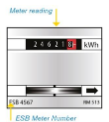
Revolving disc 24-hour meters have a single row of numbers that records your usage across the entire 24 hours in a day, as shown in the diagram below.
How to read your meter:
- Read the numbers from left to right, including any zeros
- Don't include any numbers after the decimal point or any numbers in red. If your meter doesn't have a decimal point, read all numbers on the dial, including any zeros.
- For example, the meter reading on the below meter is 24621.
Revolving disc Day/Night meter
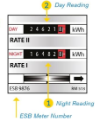
Revolving disc Day/Night meters have two rows of numbers to separately record the electricity you use during the day and night respectively. These rows may be labelled as Day and Night, or 1/I (Night) and 2/II (Day), as shown in the diagram below.
How to read your Day/Night meter
- For each row, read the numbers from left to right, including any zeros
- Don't include any numbers after the decimal point or any numbers in red. If your meter doesn't have a decimal point, read all numbers on both dials, including any zeros.
For example, the Day meter reading on the below meter in 24621, and the Night reading is 164828.
Digital meter
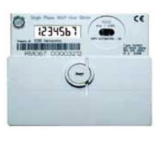
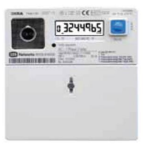
There are two types of digital meter. The first has an electronic display which changes every nine seconds. The second type has a 'scroll' button which allows you to manually change the screens, as shown below.
The way you read your digital meter depends on whether you're on a 24-hour rate or are on a day and night rate. This can be found on your previous bill under 'usage details' and on your 'meter read' section of your online account.
To read your meter when you are on 24-hour rates:
- Scroll or wait until your digital meter shows screen 0, as shown in the below diagram. If you have a scroll button, you'll need to press it three times
- Write down the numbers from left to right, including any zeros
There are no decimal points on digital meters.
To read your meter when you are on Day/Night rates
- For your Day reading, wait until your meter shows the '2' screen. If you have a scroll button press it four times to get the '2' screen.
- For your Night Reading, wait until your meter shows the '1' screen. If you have a scroll button press it five times to get the '1' screen.
- Write down both numbers for Day and Night from left to right, including any zeros
There are no decimal points on digital meters.
Smart meters
Smart meters are the next generation of metering technology. A smart meter measures the electricity you use and automatically sends your meter reading directly to ESB Networks, significantly reducing the need for estimated bills or manually submitting reads once activated.
An activated smart meter will record your usage either every 30 minutes, known as interval reads, or once every two months, known as non-interval reads. You can choose to have interval or non-interval reads if the signal from your meter is strong enough, however only non-interval reads may be available in low signal areas.
If your smart meter isn't activated, you can have it activated by calling our Customer Service Team on 0818 812 22 20.
If your smart meter isn't activated, we recommended that you submit meter reads to ensure accuracy of your bill.
If you're on 24-hours rates, you need to press the 'push' button twice to get your 24-hour read.
If you're on Day, Night and peak rates, you'll need to press the 'push' button three times to get the Night read, four times to get the Day read and five times to get the Peak read.
If you have solar panels, you can press the 'push' button seven times to get your total exported electricity.
How to read a gas meter
Digital meter
Digital meters have an electronic display which changes automatically you can directly read the numbers (digits) like in the diagram below.
- press the red button 'A'
- read all of the figures as displayed on your meter from left to right (including zeros if displayed)
- ignore any digits to the right of the comma or in the red boxes

Clock meter
If you have a dial (or clock) meter it will display a series of dials, like the diagram below. The four small dials at the bottom should be read from left to right.
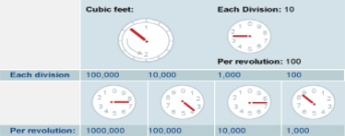
- The position of the pointer on the dial indicates what the reading should be.
- If the pointer is between two figures, round down to the lower figure, e.g. if it's between 7 and 8, use 7. However, if the pointer is between 9 and 0, use 9.
How to submit your meter reading
• Log into your online account via My Account
Monday to Friday: 8am - 6pm
Monday to Friday: 8am - 6pm